Crackle and buzz are mechanical stories more often than software ones, and the fix starts with proving where in the chain the noise is born. One steady tone and two minutes of wiggling will pinpoint it.
Step 1: get a clean test signal
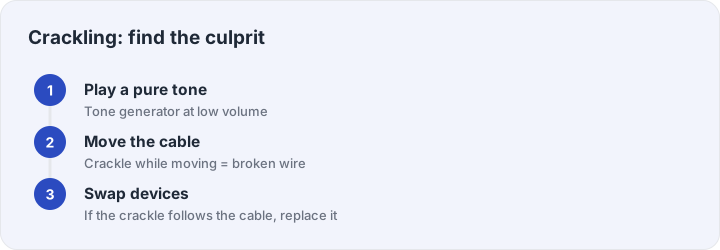
Play a sine from the tone generator at low-to-moderate volume — 440 Hz for general diagnosis, 60 Hz for bass-region complaints. A pure tone makes crackle obvious and repeatable in a way that music never is, because music hides crackle between beats while a steady tone exposes it as constant grit.
Step 2: separate wire from driver
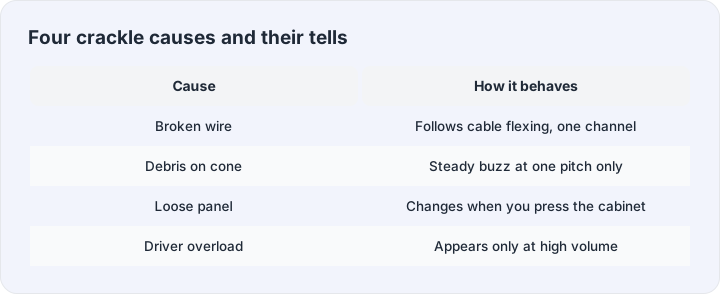
Gently flex the cable at the plug and at the earcup while the tone plays. Crackle that follows the flexing is a broken conductor or a failing solder joint — the fix is a new cable if yours is detachable, or a repair shop if not. Crackle that ignores the cable lives in the speaker itself, so move on.
Step 3: driver-level causes
Three mechanical culprits produce stationary crackle. First, debris: a crumb or hair resting on the driver cone buzzes in sympathy; a soft brush and low-pressure air clear most cases. Second, a loosened part — a screw in the enclosure or a dust cap whose glue has given up buzzes at specific frequencies; try pressing gently on different panels while the tone plays, and if pressing changes the noise, opening and re-seating is the cure. Third, an overheated or aged driver: distortion that appears only at volume, with a burnt smell in bad cases, means the voiceformer was pushed past its limits at some point.
Step 4: software crackle exists too
If the tone is clean on another device but crackles on this one, the noise is electronic: buffer underruns from a maxed CPU (crackle that syncs with system load), a sample-rate mismatch (48 kHz stream forced through a 44.1 kHz-only device path), or audio enhancements in the driver panel, which sound like crackle when their processing glitches. Disable enhancements first — it is free and surprisingly often the answer.
When to stop fixing
A driver that crackles at all volumes with no debris and no loose parts has an internal failure that is rarely economical to repair on consumer gear. Bank the case knowledge, recycle responsibly, and next time keep your listening volume out of the red — overload is how most drivers earn their crackle in the first place.