What this sound test checks
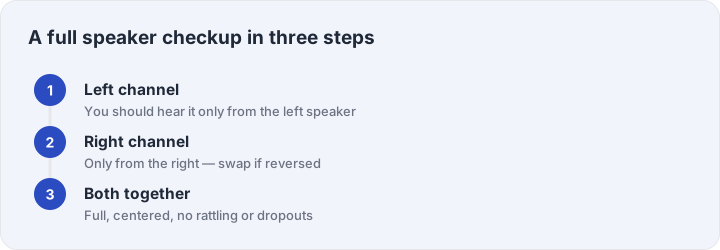
The test plays a short tone through your left speaker, then your right, then both at once. That is the fastest possible hardware check: if each side plays when it should, your output chain — cable, Bluetooth link, drivers, speakers — is fundamentally healthy. If one side is silent, or the channels arrive swapped, or something rattles, you have found your problem in seconds instead of guessing through settings menus.
Everything runs in your browser. The tones are generated on your device with the Web Audio API, so there is nothing to download and no file to trust. Your volume stays under your control: start around 60–70% and adjust while the test plays.
If a side is missing
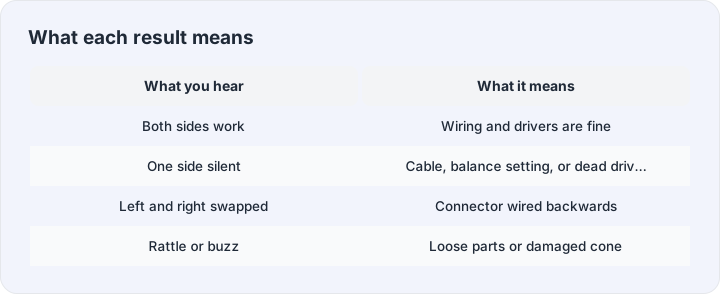
One silent channel almost always comes from three places. First, the cable or plug — flex it gently near the connector while the both-channel step plays; a crackling or dropping side means a broken wire. Second, the system balance slider, which many people have nudged without noticing; check your sound settings for L/R balance centered. Third, the source itself — some old mono files put everything on one side. Our no-sound troubleshooting guide walks through the full checklist when nothing plays at all.
Beyond the quick test
When the channel check passes, the rest of the toolbox answers the follow-up questions. The headphone test adds a moving pan sweep that shows whether the stereo image glides smoothly. The microphone test records a five-second clip and plays it back, so you hear exactly what callers hear. The bass test walks up from 20 Hz to find where your speakers stop being honest. And the tone generator plays any frequency with any waveform — the professional’s Swiss knife, free here without the paywalls other test sites put on it.